


Knowunity: AI Study & Homework
4.8784.00 Reviews
App Specs
- Version
- 6.35.2
- Updated On
- License
- Free
- Downloads
- 10,000,000+
- Developer
- Knowunity
- Categories
- Education
- Platform
- Android, iOS
Screenshots
 Analysis by AppCompare
Before opening any solution tool, I find it helps to decide what I actually need: an explanation, a quick review, or material to practise. That small pause keeps a study app from becoming a place where I collect answers without learning the method. With Knowunity: AI Study & Homework, I get the most value when I treat its different resources as parts of one routine rather than as shortcuts that all do the same job.
A useful routine starts with the question, not the app
For a homework problem, I would first try it myself and mark the exact step where I get stuck. Then I can ask for help with that point and compare the explanation with my working. If I enter a whole assignment before making an attempt, it is easier to skim the result and mistake recognition for understanding. The better habit is to use a solution to diagnose a gap, then close the app and see whether I can repeat the reasoning unaided.
For a reading-heavy subject, I would start with notes or an explanation, then turn the key ideas into flashcards or a short quiz. That sequence gives each tool a clear purpose: notes help me orient myself, while questions reveal what I can recall without looking. I would keep cards focused on one fact, definition, or relationship at a time; a card that contains an entire paragraph is hard to review honestly.
Small choices that make study sessions more useful
I’d also be selective about what I save or revisit. When a resource seems helpful, I would note the topic and the particular point it clarified, rather than assuming I will remember why I kept it. This is especially useful when several explanations cover the same broad subject but only one addresses the exact snag in my homework.
AI answers deserve a quick check, too. I compare the steps with my textbook, class notes, or the method my teacher expects, especially when notation or wording matters. A fluent explanation can still leave out an assumption or use a different route. That does not make the tool useless; it means I use it as a study aid, not as the final authority on every answer.
Where it fits among study tools
Knowunity is an education app from Knowunity, and its appeal is the combination of homework help with study material and practice. A calculator is better when I only need a numerical result, while a notebook or a dedicated flashcard routine may suit me better when I want a simple, tightly controlled system. Here, I can move from a question to an explanation and then to review without assembling several separate tools, but that convenience works best when I bring my own plan.
The app is free to start, though it also offers in-app purchases, so I would check the current purchase details before deciding whether any paid option is worthwhile for me. It is rated for Everyone 10+, which makes it relevant to younger students as well as older ones, but I would still encourage younger users to ask a teacher or parent when an explanation seems confusing or doesn’t match classwork.
Worth Reading Before You Choose

Switching to Android Auto Means Rethinking Your Driving Routine

Google Calendar Makes a Crowded Week Easier to Manage

Baby Panda World Brings Quick Play to Modern Phones, but Its Game Library Feels Busy

ESPN’s Live Game View Makes Following Close Games Easier

QuizzLand Review: A Good Fit for Short Trivia Breaks, Not Every Player

Basketball Stars: Multiplayer Is Fast, but Can It Recover When Matches Go Wrong?
Getting Started
Downloading Knowunity: AI Study & Homework was a breeze. Available on both Android and iOS, it’s just a tap away. Once installed, you’re greeted with a sleek and user-friendly interface. No complicated menus or overwhelming options, just a simple sign-up process that gets you started in no time.
As soon as you’re in, the app offers a quick tour. I appreciated this little walkthrough, as it quickly oriented me to its features. The AI-driven assistance promised to help me tackle my homework efficiently, and I was eager to put it to the test.
Features Galore
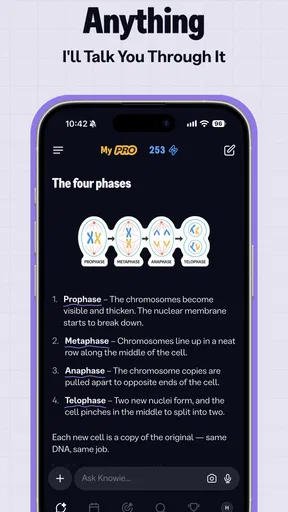
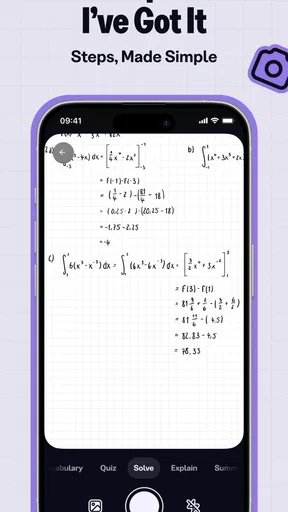
The app is packed with features designed to make studying not just bearable but enjoyable. One of my favorites is the AI-powered homework helper. You can snap a picture of your assignment or type in your question, and voilà, the app provides step-by-step solutions. It’s like having a personal tutor in your pocket!
Another standout feature is the vast resource library. From video explanations to detailed notes, it covers a wide range of subjects. Whether you’re grappling with algebra or diving into history, there’s something for everyone. The content is well-organized and easy to navigate, making study sessions more productive and less frustrating.
Interactive Learning
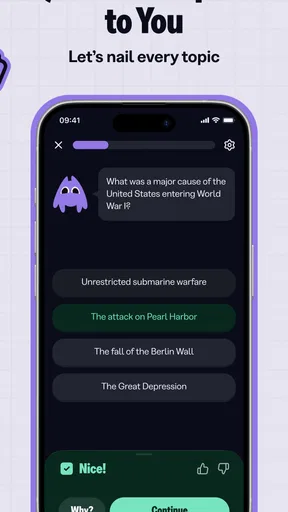
Beyond just providing answers, Knowunity encourages interactive learning. The app includes quizzes and flashcards that help reinforce what you’ve learned. This not only aids retention but also makes learning a bit more fun. Who knew brushing up on chemistry could be this engaging?
Moreover, the app’s community feature allows you to connect with other students. You can share notes, ask questions, and collaborate on projects. It’s like having a virtual study group available 24/7. This sense of community is a nice touch, especially when you're feeling stuck or need a morale boost.
Performance and Usability
Now, let’s talk about how it performs. The app runs smoothly without any noticeable lag, even when multitasking between different features. The AI’s response time is commendable, quickly analyzing and solving queries. Plus, it’s not just about speed; the solutions are accurate and easy to understand.
Usability is another strong suit of Knowunity. The design is intuitive, and even those who aren’t tech-savvy will find it easy to navigate. The clean layout and straightforward functionalities mean you won't waste time figuring out how to use it, letting you focus on what matters: your studies.
Final Thoughts
All in all, Knowunity: AI Study & Homework makes for a robust study companion. It’s perfect for students looking to streamline their study process and tackle homework efficiently. While it doesn’t replace the need for traditional studying, it certainly complements it.
Whether you’re a high school student or tackling higher education, this app has something beneficial to offer. It’s like having a supportive study buddy that’s always ready to help. If you're curious, I’d say give it a shot. It could be the academic ally you've been searching for!
A realistic session, from confusion to recall
Imagine I have a maths problem due tomorrow and cannot see why my answer differs from the one in class. I would take a picture or type the question, but first I would write down my own attempt. After checking the explanation, I would compare each step with my notes and identify whether the error was arithmetic, a misunderstood rule, or simply a missed step. Then I would close the solution and try a similar problem from my homework unaided. That final attempt is the part that tells me whether the help stuck.
For a history test, I would use the app differently: locate a clear set of notes, turn the names or causes I keep mixing up into concise flashcards, and quiz myself later rather than rereading the same page. A useful trade-off is that this workflow takes a little longer than copying an answer, but it gives me a better signal about what I can actually retrieve under test conditions.
Who benefits most, and who may prefer another approach
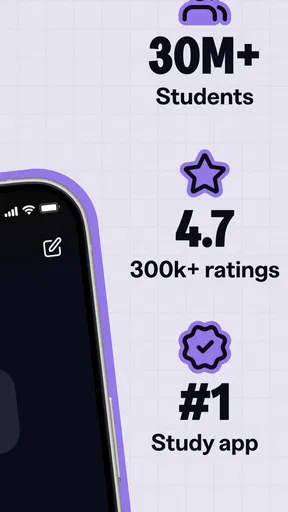
I think the strongest fit is a student who moves between several kinds of study work: asking for help on a tricky question, looking for another explanation, and reviewing with flashcards or quizzes. It is also handy for someone who wants a starting point when studying alone, because a question can lead into material that supports a fuller review. The app’s scale suggests it has found a broad student audience: it has over ten million installs and an average rating of 4.8 from around 120,000 ratings.
It is less suitable as a replacement for a teacher, a textbook, or a carefully structured course. If I need an exact curriculum sequence, formal feedback on an essay, or a source I can cite in academic work, I would use the relevant class materials and treat the app as supplementary. A student who prefers a quiet, paper-only method may also find that switching between answers, resources, and practice adds more stimulation than they want.
What to check before making it a habit
Knowunity has been available since September 2020, and the current version is 6.23.2. On Android, it requires version 8.0 or later. I would check that compatibility before installing, particularly on an older device, and make sure the app feels comfortable to use for the subjects I study. Its rating and large audience are reassuring signs of adoption, but they cannot guarantee that every explanation will match my course or that every topic will be equally useful to me.
The free starting point makes it easy to try the basic study workflow, while in-app purchases range from $4.99 to $71.99 per item. I would not pay simply because an exam is close: first I would use the available tools consistently and decide what specific limitation a purchase would solve. Since purchases are listed per item, I would review the price and terms shown in the app before confirming anything, rather than assuming that one purchase unlocks every resource.
Making the community and AI work for you
Student-shared notes can be a helpful second perspective, especially when my own notes are incomplete or a classmate has organized a topic differently. I would still check dates, terminology, and examples against my course materials; a note that is clear to its author may not use the same definitions my teacher expects. When I ask a question in a community space, including the topic and the point where I am stuck is more likely to invite a useful response than posting a broad request for answers.
The AI helper is most valuable when I ask a focused question and read the reasoning rather than just the result. If the first explanation does not make sense, I would rephrase the part I do not understand or compare it with another resource, instead of repeating the same prompt and hoping for a better answer. This gives me a practical way to test the explanation: can I describe the key step in my own words, and can I use it on a fresh example?
A measured verdict for regular study
Knowunity is free to download, developed by Knowunity, and designed for education; its store summary presents it as a tool for homework help, notes, and flashcards. What matters to me in practice is whether I use that mix deliberately. I would build a repeatable routine around it: attempt first, ask a narrow question, verify the reasoning, and finish with recall practice. That makes the app a useful companion rather than an answer dispenser.
My recommendation is strongest for students who want flexible support across homework and revision and are willing to check what they learn. It is not the right choice for someone looking for guaranteed course-specific instruction or a substitute for doing the work. Used with a little discipline, it can make a difficult evening feel more manageable; used passively, it can make finished answers look like finished learning.
Pros
- User-friendly interface enhances learning.
- AI-driven assistance simplifies homework tasks.
- Comprehensive study resources available.
- Regular updates keep content fresh.
- Offline access for studying without internet.
Cons
- Limited subjects for advanced learners.
- Occasional AI inaccuracies in answers.
- In-app purchases can be pricey.
- Requires sign-up to access full features.
- Some features need stable internet connection.
FAQs for Knowunity: AI Study & Homework
What is Knowunity: AI Study & Homework and how does it work?
Knowunity: AI Study & Homework is an educational app designed to assist students with their study and homework needs. Utilizing AI technology, it offers personalized study plans, homework assistance, and a wide range of learning resources. The app adapts to individual learning styles, providing interactive tutorials, quizzes, and feedback to enhance the overall learning experience.
Is Knowunity suitable for all age groups and educational levels?
Knowunity is primarily targeted at middle school, high school, and college students. The app's features are tailored to suit a variety of educational levels, offering resources and support for different subjects and curriculums. However, younger learners may find some content challenging, so parental guidance is recommended for elementary-level students.
Does Knowunity require an internet connection to function?
While some features of Knowunity do require an internet connection, such as accessing updates or live tutoring sessions, many resources can be downloaded for offline use. This flexibility allows students to continue studying and completing homework even in areas with limited internet connectivity, making it a convenient tool for learning on the go.
Are there any subscription fees or in-app purchases in Knowunity?
Knowunity offers both free and premium versions. The free version provides access to basic features, while the premium version unlocks additional resources and advanced functionalities. Subscription fees apply for the premium version, and there may also be optional in-app purchases for specific content or features, enhancing the overall learning experience.
How does Knowunity ensure the accuracy and reliability of its educational content?
Knowunity collaborates with educators and subject matter experts to develop its content, ensuring it aligns with educational standards and curriculums. The app regularly updates its resources to reflect the latest information and best practices. User feedback and reviews also play a crucial role in maintaining the quality and reliability of the content provided.


